Why Facebook Image Sizes Matter
Facebook remains the world's largest social media platform, with billions of active users. To effectively engage with this massive audience, your visual content must be properly optimized for each of Facebook's various formats. Using the correct dimensions ensures your content looks professional, displays correctly across all devices, and delivers maximum impact.
Incorrectly sized images can result in unwanted cropping, distortion, or pixelation—issues that can undermine your brand's credibility and reduce engagement rates. Furthermore, Facebook's algorithm tends to favor content that follows the platform's recommended specifications, potentially increasing your reach and visibility.
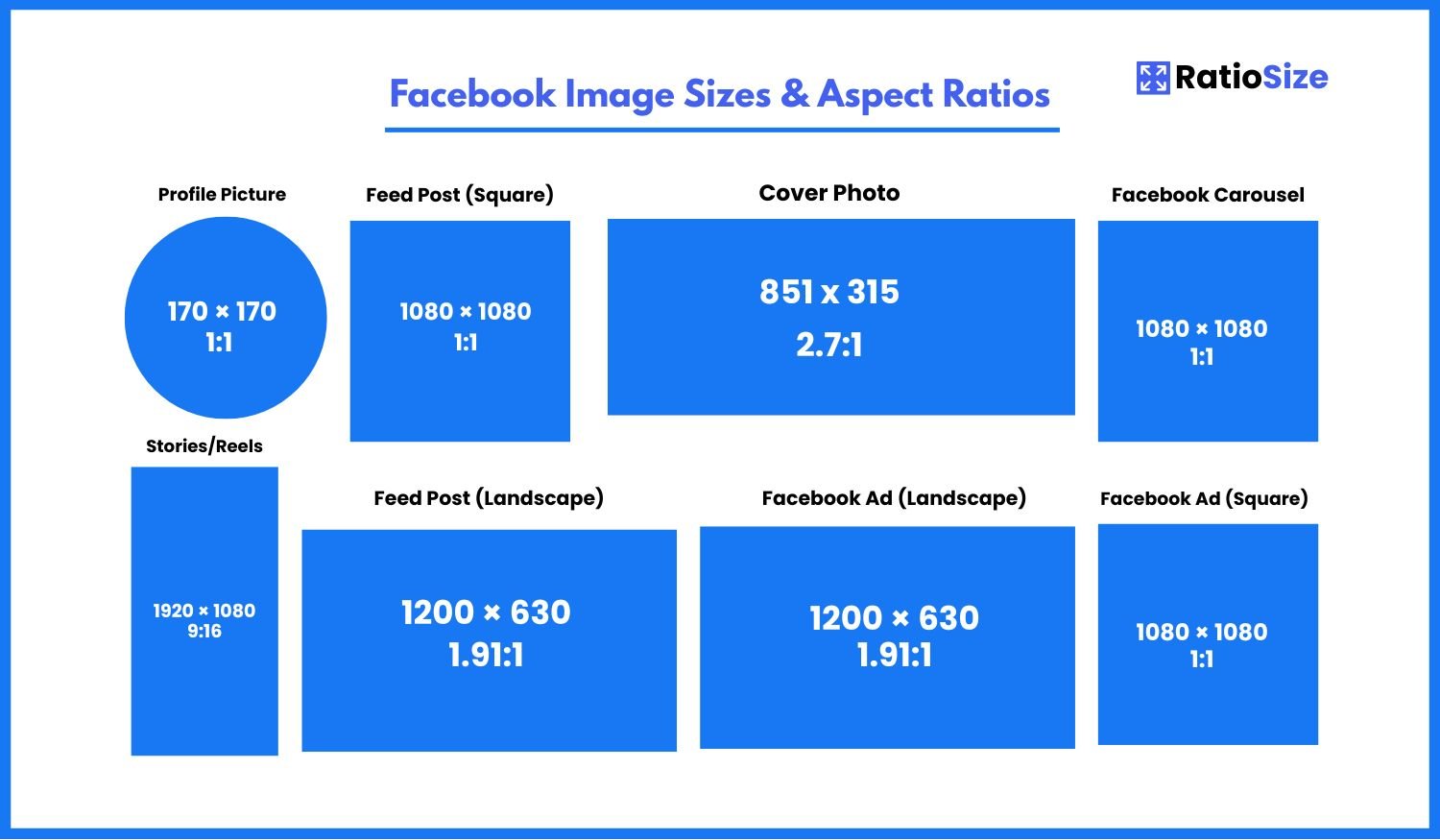
Facebook Image Size Chart
| Content Type | Aspect Ratio | Dimensions (pixels) | Notes |
|---|---|---|---|
| Profile Picture | 1:1 | 170 × 170 | Displays at 128 × 128 on desktop |
| Cover Photo | 2.7:1 | 851 × 315 | Mobile: 640 × 360 |
| Feed Post | 1.91:1 | 1200 × 630 | Recommended landscape format |
| Square Post | 1:1 | 1080 × 1080 | Good for cross-platform consistency |
| Stories/Reels | 9:16 | 1080 × 1920 | Full-screen vertical format |
| Event Cover | 1.91:1 | 1200 × 628 | Similar to feed posts |
| Group Cover | 1.91:1 | 1640 × 856 | Slightly larger than standard covers |
| Ad (Square) | 1:1 | 1080 × 1080 | Versatile ad format |
| Ad (Landscape) | 1.91:1 | 1200 × 628 | Standard for feed ads |
Profile Pictures
Your Facebook profile picture is the visual representation of you or your brand across the entire platform. It appears beside your name on posts, comments, and in search results.
- Recommended size: 170 × 170 pixels
- Display size: 128 × 128 pixels on desktop, 36 × 36 pixels in comments
- Aspect ratio: 1:1 (square)
- Format: JPG or PNG (PNG recommended for logos)
Pro tip: Although Facebook profile pictures display as squares on your profile page, they appear as circles in feeds and comments. Design with a central focus to ensure nothing important gets cropped in the circular display.
Cover Photos
Your Facebook cover photo is a large banner that appears at the top of your profile or page. It's prime real estate for showcasing your brand's personality or highlighting current promotions.
- Recommended size: 851 × 315 pixels
- Mobile display: 640 × 360 pixels
- Aspect ratio: 2.7:1 (approximately)
- Safe zone: Keep important elements in the center as the image displays differently on mobile devices
Important note: Facebook cover photos are displayed differently on desktop and mobile. On mobile, the image is cropped from the top and bottom. Design with a central focus to ensure key elements remain visible across all devices.
Facebook Feed Posts
Facebook supports several image formats for timeline posts. The platform will automatically format your images, but using the recommended dimensions ensures optimal display.
Landscape Posts (1.91:1)
The standard and recommended format for Facebook feed images.
- Recommended size: 1200 × 630 pixels
- Minimum size: 600 × 315 pixels
- Aspect ratio: 1.91:1
- Best for: Link shares, wide photos, most standard content
Square Posts (1:1)
Square posts work well for content that may be cross-posted to Instagram or for images with centrally focused subjects.
- Recommended size: 1080 × 1080 pixels
- Minimum size: 600 × 600 pixels
- Aspect ratio: 1:1
- Best for: Cross-platform content, portraits, product photos
Vertical Posts
While Facebook allows vertical images, they're typically less optimal for the feed. If you must use vertical formats:
- Maximum height: 1350 pixels
- Width: 500+ pixels
- Aspect ratio limit: 4:5 is the tallest recommended ratio
- Note: Taller images may be cropped in the feed
Facebook Stories and Reels
Facebook Stories and Reels use a full-screen vertical format designed for mobile viewing. These formats have become increasingly important as Facebook emphasizes short-form video content.
Stories
Stories appear for 24 hours and use the full vertical screen space on mobile devices.
- Recommended size: 1080 × 1920 pixels
- Aspect ratio: 9:16
- Duration: Up to 20 seconds per story
- Safe zone: Keep essential content away from the top and bottom 14% where UI elements appear
Reels
Reels are Facebook's answer to TikTok and Instagram Reels—short-form vertical videos.
- Recommended size: 1080 × 1920 pixels
- Aspect ratio: 9:16
- Duration: Up to 60 seconds
- Safe zone: Keep key elements centered to avoid interface overlays
Facebook Group and Event Images
Facebook Groups and Events have their own specific image requirements for cover photos and other elements.
Group Cover Photo
Group covers appear at the top of your Facebook Group and establish its visual identity.
- Recommended size: 1640 × 856 pixels
- Minimum size: 820 × 428 pixels
- Aspect ratio: 1.91:1 (approximately)
- Note: Group members appear over the bottom left of the cover
Event Cover Photo
Event covers display at the top of event pages and in event cards throughout Facebook.
- Recommended size: 1200 × 628 pixels
- Aspect ratio: 1.91:1
- Best practice: Include event details visually when possible
Facebook Ads
Facebook offers various ad formats across its platform. Using the correct dimensions ensures your ads display properly and achieve maximum engagement.
Feed Ads
Ads that appear in users' main timeline can use several formats:
- Landscape (Recommended): 1200 × 628 pixels (1.91:1 ratio)
- Square: 1080 × 1080 pixels (1:1 ratio)
- Vertical: Up to 4:5 ratio (less common)
- Text limit: 125 characters for primary text (more text will be truncated)
Stories Ads
Full-screen vertical ads that appear between stories:
- Recommended size: 1080 × 1920 pixels
- Aspect ratio: 9:16
- File size limit: 30MB
- Design note: Leave room at the top and bottom for interactive elements
Carousel Ads
Ads featuring multiple images or videos that users can swipe through:
- Recommended size: 1080 × 1080 pixels
- Aspect ratio: 1:1 (square)
- Cards: 2-10 images or videos
- Video length: Up to 240 minutes
Facebook Safe Zones and Text Limits
Facebook has specific guidelines about text overlay on images, particularly for ads. While the strict 20% text rule has been relaxed, images with excessive text may still receive limited distribution.
- Cover Photos: Keep important elements in the center 60% of the image to ensure visibility on both desktop and mobile.
- Ad Images: Minimize text overlay for better ad delivery. Facebook's system still favors images with less text.
- Stories/Reels: Leave approximately 250 pixels of padding at the top and bottom (14% of height) to avoid UI overlays.
Optimizing Images for Facebook
Beyond dimensions, consider these factors to ensure your Facebook images look their best:
- File Format: JPG for photos, PNG for graphics with text or transparency, GIF for simple animations.
- File Size: Keep images under 5MB when possible to ensure fast loading (30MB max for ads).
- Resolution: Use high-resolution images that meet or exceed the recommended dimensions.
- Color Profile: sRGB color profile works best for web display.
- Compression: Optimize images to reduce file size without sacrificing quality.
By following these guidelines, you'll ensure your Facebook content displays optimally across all devices and formats, helping you maximize engagement and achieve your social media goals.