Understanding the 4:3 Aspect Ratio
The 4:3 aspect ratio, sometimes expressed as 1.33:1, is one of the most historically significant aspect ratios in visual media. This format dominated television, computer displays, and photography for decades before widescreen formats gained prominence. The ratio means that for every 4 units of width, there are 3 units of height, creating a nearly square rectangular shape that feels balanced and natural for many types of content.
Despite the shift toward wider formats like 16:9 in recent years, the 4:3 ratio remains relevant and widely used in specific contexts today. Its balanced proportions make it particularly suitable for certain types of content where the extra width of widescreen formats doesn't add significant value.
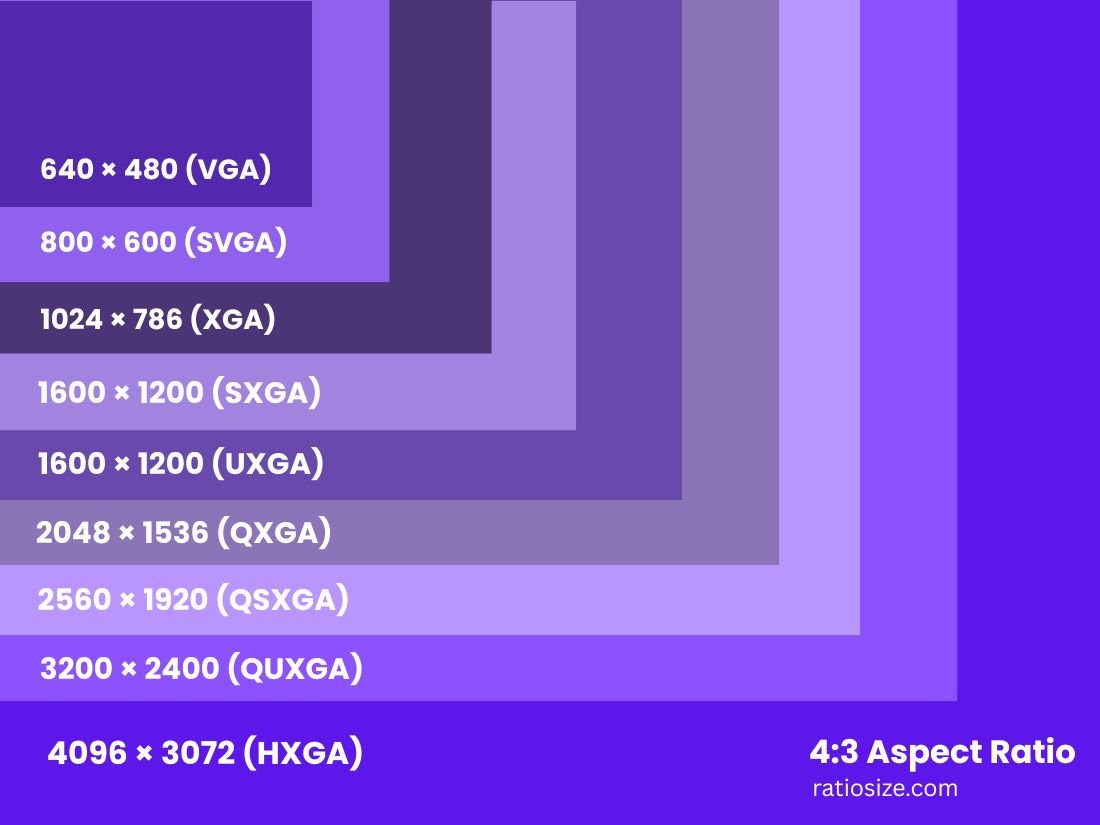
Common 4:3 Resolutions and Their Applications
| Resolution Name | Dimensions (pixels) | Total Pixels | Common Uses |
|---|---|---|---|
| QVGA | 320 × 240 | 76,800 | Feature phones, older portable devices |
| VGA | 640 × 480 | 307,200 | Older computers, basic projectors, SD video |
| SVGA | 800 × 600 | 480,000 | Older presentations, web design |
| XGA | 1024 × 768 | 786,432 | Business projectors, older laptops |
| SXGA (variant) | 1280 × 960 | 1,228,800 | Professional monitors, medical displays |
| UXGA | 1600 × 1200 | 1,920,000 | Professional displays, high-res printing |
| QXGA | 2048 × 1536 | 3,145,728 | Professional imaging, specialized displays |
| QSXGA | 2560 × 1920 | 4,915,200 | High-end professional displays |
| QUXGA | 3200 × 2400 | 7,680,000 | Specialized visualization systems |
| HXGA | 4096 × 3072 | 12,582,912 | Professional printing, high-end imaging |
| 8K UHD (4:3) | 7680 × 5760 | 44,236,800 | Experimental, future applications |
Historical Significance of 4:3
The 4:3 aspect ratio's prominence is deeply tied to the history of visual media technology. This format became standardized in the early days of film and television for several practical reasons:
- Film origins: Early silent films used a 4:3 ratio as it was close to the 35mm film standard established in the 1890s.
- Television adoption: When television broadcasting began in the 1930s and 1940s, engineers adopted the 4:3 ratio to match the existing film standards of the time.
- CRT constraints: The circular cathode ray tubes (CRTs) used in early televisions could most efficiently display a nearly square image, making 4:3 a natural choice.
- Computer monitors: Early computer displays followed television standards, adopting the 4:3 ratio for consistency and manufacturing efficiency.
For most of the 20th century, 4:3 remained the dominant aspect ratio across film, television, and early digital media. It wasn't until the late 1990s and early 2000s that widescreen formats like 16:9 began to replace 4:3 as the standard for consumer displays.
4:3 in Digital Photography
While many modern cameras default to wider aspect ratios, the 4:3 format remains popular in digital photography for several reasons:
- Micro Four Thirds system: This popular camera system natively shoots in 4:3, following the format of its sensor.
- Compositional advantages: The more square format works well for portraits, architectural photography, and compositions where vertical elements are important.
- Print compatibility: The 4:3 ratio closely matches common print sizes like 8×10 inches, requiring minimal cropping.
- Medium format similarity: The 4:3 ratio approximates the feel of medium format film photography, which many photographers prefer for its balanced composition.
Photographer's tip: When shooting in 4:3, consider the additional vertical space compared to 3:2 (standard DSLR) or 16:9 formats. This extra height works particularly well for portraits, architecture, and scenes with prominent vertical elements.
4:3 in Presentations and Business
Despite the shift toward widescreen formats, 4:3 remains relevant in business and educational contexts:
- Projector compatibility: Many conference rooms and classrooms still use older projectors with native 4:3 resolution.
- Document optimization: The 4:3 ratio better accommodates standard document layouts and printable materials.
- Slide design: The more square format works well for presentations that prioritize text and data over cinematic imagery.
- Cross-compatibility: 4:3 presentations display reasonably well on both 4:3 and 16:9 screens, while the reverse is often problematic.
Presentation tip: When creating 4:3 slides, take advantage of the additional vertical space for content organization. The format allows for more balanced layouts when combining headers, body text, and supporting visuals.
Converting Between 4:3 and Other Aspect Ratios
When converting content between 4:3 and other aspect ratios, you'll need to decide between cropping, letterboxing, or pillarboxing:
Converting from 4:3 to 16:9 (Widescreen)
- Cropping method: Remove portions from the top and bottom of the 4:3 image to fit the wider 16:9 frame.
- Letterboxing method: Add black bars to the left and right sides to maintain the original 4:3 content within a 16:9 frame.
- Mathematical conversion: For a 4:3 image with height H, the 16:9 height would be H × (9÷16) × (4÷3), or approximately 0.75H.
Converting from 16:9 to 4:3
- Cropping method: Remove portions from the left and right sides of the 16:9 image to fit the narrower 4:3 frame.
- Pillarboxing method: Add black bars to the top and bottom to maintain the original 16:9 content within a 4:3 frame.
- Mathematical conversion: For a 16:9 image with width W, the 4:3 width would be W × (3÷4) × (16÷9), or approximately 1.33W.
Design consideration: When creating content that might need to be displayed in multiple aspect ratios, consider placing important elements in the "safe area" that would be visible in both formats.
Technical Considerations for 4:3 Content
Display and Rendering
When working with 4:3 content on modern systems:
- Modern displays: Most LCD, LED, and OLED displays use native 16:9 or 16:10 ratios, meaning 4:3 content will typically display with black bars on the sides (pillarboxing).
- Scaling options: Some displays offer scaling options to stretch 4:3 content to fill widescreen displays, but this distorts the image.
- Pixel density: When displaying 4:3 content on non-4:3 screens, be aware that scaling can affect sharpness and clarity.
File Size Considerations
For a given resolution class, 4:3 content typically has more pixels than 16:9 content with the same width:
- A 1024×768 (4:3) image contains 786,432 pixels
- A 1024×576 (16:9) image contains 589,824 pixels
- This represents approximately 33% more pixels in the 4:3 format
This increased pixel count can affect file sizes, rendering times, and storage requirements for 4:3 content.
Future of the 4:3 Aspect Ratio
While wider formats dominate consumer displays, 4:3 maintains relevance in specific contexts:
- Specialized displays: Medical imaging, industrial equipment, and certain professional applications continue to use 4:3 displays.
- Photography: The balanced composition offered by 4:3 ensures its continued use in digital photography.
- Vintage aesthetic: The 4:3 ratio is sometimes deliberately chosen for its nostalgic or vintage visual style.
- Mixed media environments: Business and educational settings often maintain 4:3 compatibility for legacy content and systems.
While unlikely to return as the dominant format for general media consumption, the 4:3 aspect ratio remains an important part of the visual media landscape with specific applications where its balanced proportions continue to offer advantages over wider formats.
Practical Applications and Tips
For Photographers
- Consider shooting in 4:3 for portraits and compositions with strong vertical elements
- The 4:3 ratio minimizes cropping when printing to 8×10" photo paper
- When displaying 4:3 photos digitally, consider adding stylized borders rather than letting the display add plain black pillarboxes
For Presenters
- Create presentation templates that work well in 4:3 for maximum compatibility with older projection systems
- Use the additional vertical space for better organization of complex information
- When presenting data, the more square format often allows for clearer visualization of charts and graphs
For Video Editors
- When working with archival 4:3 footage, consider creative framing within 16:9 compositions rather than simple pillarboxing
- Be aware that converting between aspect ratios may require reframing key shots to maintain important visual elements
- Consider whether the content benefits from the additional vertical information in 4:3 versus the wider field of view in 16:9
The 4:3 aspect ratio remains a versatile and historically significant format that continues to offer specific advantages in many contexts. By understanding its properties and appropriate applications, you can make informed decisions about when to use this classic aspect ratio in your visual projects.