Understanding Snapchat's Format Requirements
Snapchat pioneered ephemeral, vertical-format content for mobile devices. Unlike traditional social networks that adapted to mobile viewing over time, Snapchat was designed exclusively for smartphone users from its inception. This mobile-first approach defines Snapchat's format requirements, with vertical 9:16 content being the standard across nearly all content types.
With over 750 million monthly active users globally, Snapchat remains a vital platform for reaching younger audiences—particularly Gen Z and Millennials. Using the correct dimensions ensures your content displays properly and engages effectively with Snapchat's highly active user base.
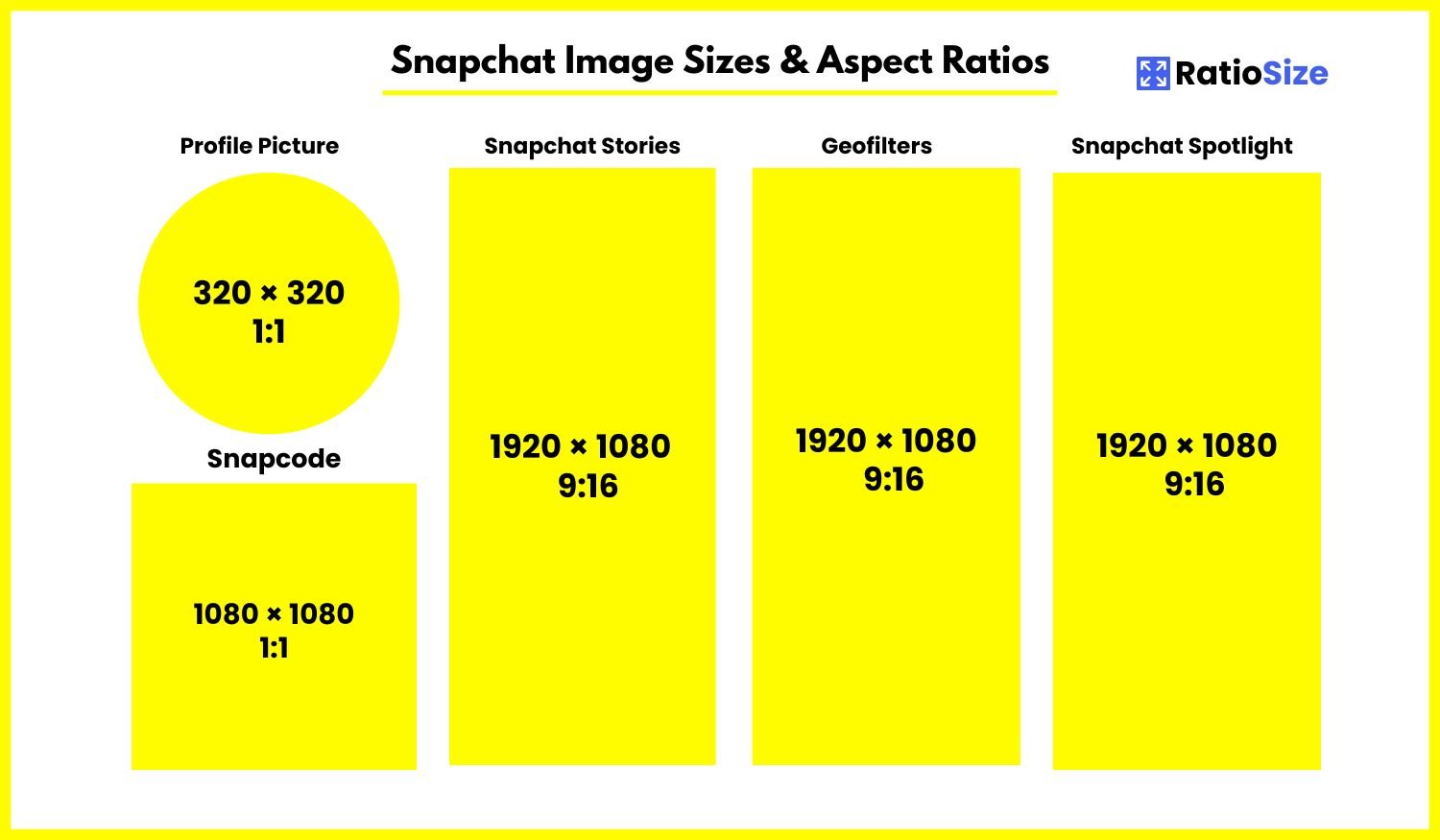
Snapchat Size Chart
| Content Type | Aspect Ratio | Dimensions (pixels) | Notes |
|---|---|---|---|
| Snaps & Stories | 9:16 | 1080 × 1920 | Standard format |
| Spotlight | 9:16 | 1080 × 1920 | Up to 60 seconds |
| Image Ads | 9:16 | 1080 × 1920 | Max file size: 5MB |
| Video Ads | 9:16 | 1080 × 1920 | 3-180 seconds |
| Collection Ads | 9:16 (main) / 1:1 (tiles) | 1080 × 1920 / 800 × 800 | 4 product tiles |
| Profile Picture | 1:1 | 320 × 320 | Displayed as circle |
| Lens Icon | 1:1 | 640 × 640 | Transparent PNG |
| Snapcode | 1:1 | 1024 × 1024 | Center logo: 252 × 252 |
| Geofilters | 9:16 | 1080 × 1920 | Transparent PNG |
Core Snapchat Content
Snapchat's primary content types include Snaps, Stories, and Spotlight. Each has specific requirements to ensure optimal display and engagement.
Snaps & Stories
Snaps are the platform's foundational content type—photo or video messages sent directly to friends or added to your Story for 24-hour viewing.
- Recommended size: 1080 × 1920 pixels
- Aspect ratio: 9:16 (vertical)
- Minimum size: 720 × 1280 pixels
- Photo format: JPG or PNG
- Video format: MP4 or MOV
- Video duration: Up to 60 seconds per Snap
- Story duration: 24 hours (unless saved to Memories or Spotlight)
Design consideration: Snapchat's interface overlays several elements onto your content, including:
- Username and time at the top
- Caption text (if added) at the bottom
- Swipe-up indicator for links (if applicable)
Leave approximately 150 pixels of space at both the top and bottom of your content to avoid important elements being obscured by these interface overlays.
Spotlight
Spotlight is Snapchat's TikTok-like feature showcasing the most entertaining Snaps from the community in a dedicated feed.
- Recommended size: 1080 × 1920 pixels
- Aspect ratio: 9:16 (vertical)
- Duration: Up to 60 seconds
- Format: MP4 or MOV
- Audio: Recommended (unlike regular Snaps, Spotlight content typically includes audio)
Optimization tip: Spotlight content competes with content from across the entire Snapchat platform, not just your friends. To stand out:
- Use high-quality video (good lighting, stable footage)
- Include trending sounds or music
- Create hook-based intros that capture attention in the first 2 seconds
- Use Snapchat's native creative tools (lenses, text, stickers) to enhance engagement
Advertising Formats
Snapchat offers various advertising formats, each with specific technical requirements to ensure optimal display and performance.
Single Image Ads
These are full-screen vertical images that appear between Stories or in the Discover section.
- Recommended size: 1080 × 1920 pixels
- Aspect ratio: 9:16
- File size: 5MB maximum
- Format: JPG or PNG
- Text: Keep copy brief (recommended under 250 characters)
- Safe zone: Center 80% of the image for important content
Design strategy: Unlike organic content, ads require special attention to branding and call-to-action elements:
- Include your logo (recommended in the top portion of the ad)
- Add a clear call-to-action
- Keep designs simple and impactful for the brief viewing window
Video Ads
Full-screen vertical video ads appearing between Stories, in Discover, or as standalone placements.
- Recommended size: 1080 × 1920 pixels
- Aspect ratio: 9:16
- Duration: 3-180 seconds (5-15 seconds recommended for non-skippable ads)
- File size: 1GB maximum
- Format: MP4 or MOV
- Video codec: H.264
- Audio: AAC audio codec
- Frame rate: 30 FPS recommended
Optimization tips:
- Front-load branding and key messages in the first 2 seconds
- Design for sound-on but ensure the ad makes sense without audio
- Include a clear call-to-action
- Keep movement and visuals dynamic to maintain attention
Collection Ads
Collection ads feature a primary image or video with tappable product tiles below, allowing users to browse products without leaving Snapchat.
- Primary image/video: 9:16 ratio (1080 × 1920 pixels)
- Product tiles: 1:1 ratio (800 × 800 pixels)
- Number of tiles: 4 product images per ad
- Tile format: JPG or PNG
- Text: Up to 34 characters per product name
- Price: Up to 8 characters (including currency symbol)
Profile Elements
Snapchat has several profile elements that require specific dimensions for optimal display.
Profile Picture
Snapchat profile pictures typically feature either your Bitmoji avatar or a photo. They appear as circles throughout the platform.
- Recommended size: 320 × 320 pixels
- Aspect ratio: 1:1 (square)
- Display: Circular crop
- Format: JPG or PNG
Note: While many users opt for Bitmoji avatars rather than photos, if using a photo, ensure important elements are centered to avoid being cropped by the circular display.
Snapcodes
Snapcodes are Snapchat's version of QR codes, allowing users to add friends, open websites, or unlock content by scanning.
- Overall size: 1024 × 1024 pixels
- Aspect ratio: 1:1
- Center logo area: 252 × 252 pixels
- Background: Transparent recommended (Snapchat will apply the yellow background)
- Format: PNG with transparency
Design tip: For branded Snapcodes, use a simplified version of your logo in the center space. The ghost outline and dots must remain unobstructed for scanning functionality.
Creative Tools and AR Elements
Snapchat offers several creative tools for brands and creators to enhance engagement, including AR lenses and geofilters.
Lens Icons
Lens icons appear in the lens carousel and serve as the visual representation of your AR effect.
- Recommended size: 640 × 640 pixels
- Aspect ratio: 1:1
- Format: PNG with transparency
- Safe zone: Central 480 × 480 pixels
Best practice: Design icons that clearly communicate what the lens does. Simple, bold designs typically perform better than complex ones in the small carousel display.
Geofilters
Geofilters are location-based overlays that users can add to their Snaps when in a specific geographical area.
- Canvas size: 1080 × 1920 pixels
- Aspect ratio: 9:16
- Format: PNG with transparency
- File size: Under 300KB
- Safe zone: Keep critical elements away from the edges and center
Design requirements:
- Leave a 310-pixel buffer zone at the top of the design
- Leave a 210-pixel buffer zone at the bottom
- Design should not cover more than 25% of the screen
- Avoid using photos (graphics only)
- Cannot include URLs, usernames, or personal information
Technical Specifications and Best Practices
Video Quality Guidelines
For optimal video quality on Snapchat, consider these technical specifications:
- Resolution: 1080 × 1920 pixels (minimum 720 × 1280)
- Aspect ratio: 9:16 vertical
- File format: MP4 or MOV with H.264 encoding
- Frame rate: 30 FPS recommended
- Bitrate: 8-12 Mbps for 1080p video
- Audio: AAC audio codec, stereo or mono
- Maximum duration: 60 seconds per Snap
Image Quality Guidelines
- Resolution: 1080 × 1920 pixels
- Format: JPG or PNG
- Color profile: sRGB
- File size: Under 5MB for best loading performance
Interface Overlay Considerations
When designing for Snapchat, be mindful of these interface elements:
- Top overlay: Username, timestamp, and sometimes buttons appear at the top (~150 pixels)
- Bottom overlay: Caption area, swipe-up option, and navigation elements (~150-200 pixels)
- Center screen: Main viewing area; keep key content here
- Edges: Avoid placing important elements near edges, as they may be cropped on certain devices
Content Strategy for Snapchat's Format
Beyond technical specifications, consider these strategic approaches to maximize the impact of your Snapchat content:
- Embrace Vertical: Design specifically for 9:16 vertical format rather than repurposing horizontal content.
- Keep it Brief: Despite longer time limits, shorter Snaps (5-15 seconds) typically perform better.
- Design for Quick Consumption: Users tap through Stories quickly; make your point immediately.
- Leverage Native Tools: Snapchat's built-in creative tools (text, stickers, AR, drawing) typically perform better than pre-produced graphics.
- Sound Strategy: Design content that works both with and without sound, as some users view Stories with audio muted.
Snapchat Formats Compared to Other Platforms
If you're creating content across multiple platforms, understanding how Snapchat's requirements compare to other social networks can streamline your content creation process.
| Platform | Stories Format | Profile Picture | Key Differences |
|---|---|---|---|
| Snapchat | 9:16 (1080 × 1920 px) | 1:1 (320 × 320 px) | Ephemeral by default, limited live links |
| 9:16 (1080 × 1920 px) | 1:1 (320 × 320 px) | More permanent options, swipe-up at 10K followers | |
| TikTok | 9:16 (1080 × 1920 px) | 1:1 (200 × 200 px) | Longer-form content, algorithm-driven discovery |
| 9:16 (1080 × 1920 px) | 1:1 (170 × 170 px) | Older demographic, more text overlay options |
Cross-platform strategy: While the 9:16 aspect ratio is consistent across most platforms' Stories features, each platform has unique overlays, interactive elements, and audience behaviors. When possible, create platform-specific variants rather than posting identical content everywhere.
Snapchat Features and Their Formatting Implications
Snapchat regularly introduces new features that may have specific formatting requirements. As of 2025, these are the most notable:
Spotlight
Spotlight is Snapchat's answer to TikTok, featuring algorithmically-selected public content. While it shares the same 9:16 format as regular Stories, content strategies differ:
- Duration: Up to 60 seconds (longer than traditional Snaps)
- Discovery: Content is shown to users beyond your followers
- Music: Licensed music tracks available for use
- Captions: More important for context as viewers may not know you
- Performance: Engagement in the first few seconds heavily influences distribution
Dynamic Lenses
AR lenses are a core Snapchat feature with specific technical requirements for creators:
- Lens Studio requirements: Templates are available for different effect types
- Textures: 2048 × 2048 maximum, power of 2 dimensions
- 3D models: Under 10MB, optimized mesh complexity
- Preview frames: What users see when browsing lenses
Snap Map
Content can appear on the Snap Map when location services are enabled:
- Format: Standard 9:16 Snaps
- Visibility: Public Stories may appear to nearby users
- Geofilters: Location-specific filters available in designated areas
Common Snapchat Format Issues and Solutions
Problem: Content Appears Cropped
Solution:
- Ensure you're using the 9:16 aspect ratio (1080 × 1920 pixels)
- Keep important content centered and away from edges
- Test on different device sizes before wide distribution
- Use Snapchat's built-in camera when possible rather than uploading
Problem: Low Video Quality
Solution:
- Ensure good lighting when capturing
- Use the highest resolution your device supports
- Avoid excessive zooming, which reduces quality
- If uploading from Camera Roll, select the highest quality version
Problem: Text Appears Too Small
Solution:
- Use Snapchat's native text tools rather than pre-adding text
- Select larger text sizes from the text tool options
- Use contrasting colors for better legibility
- Keep text brief and to the point
By adhering to Snapchat's format specifications and implementing these best practices, you'll create content that displays optimally and engages effectively with the platform's audience. Remember that Snapchat's ephemeral, casual nature calls for authentic, in-the-moment content rather than highly polished production in most cases.