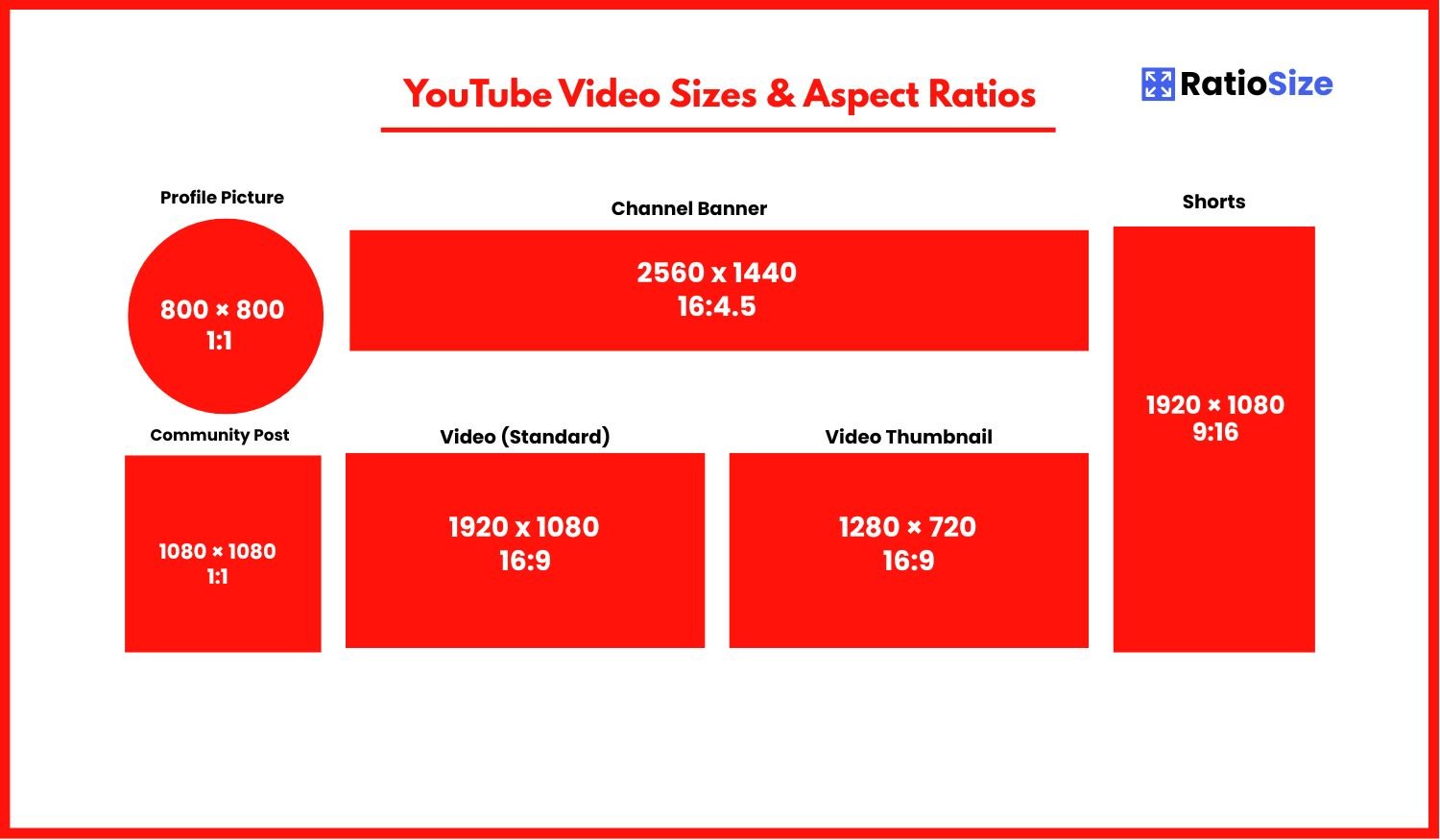
Why YouTube Dimensions Matter
YouTube is the world's largest video platform, with over 2.7 billion logged-in monthly users watching billions of hours of content daily. With such a massive audience, ensuring your videos and channel elements are properly optimized is crucial for success. The right dimensions not only make your content look professional but also ensure it displays correctly across multiple devices—from smartphones to smart TVs.
Using incorrect dimensions can result in your content being stretched, cropped, or letterboxed (black bars added), all of which create a suboptimal viewing experience. Additionally, YouTube's algorithm tends to favor content that meets its recommended specifications, potentially boosting your visibility in search results and recommendations.
YouTube Video Size Chart
| Content Type | Aspect Ratio | Dimensions (pixels) | Notes |
|---|---|---|---|
| Standard Video | 16:9 | 1920 × 1080 (1080p) | HD quality recommended |
| YouTube Shorts | 9:16 | 1080 × 1920 | ≤60 seconds length |
| Thumbnail | 16:9 | 1280 × 720 | Max file size: 2MB |
| Channel Banner | 16:4.5 | 2560 × 1440 | Safe area: 1546 × 423 |
| Profile Picture | 1:1 | 800 × 800 | Displays as circle |
| End Screen | 16:9 | Same as video | 5-20 seconds duration |
| Merch Image | 16:9 | 1280 × 720 | For merchandise shelf |
| Chapter Cover | 16:9 | Auto-generated | From video frames |
YouTube Video Formats
YouTube primarily supports two video formats: standard landscape videos and vertical Shorts. Each has specific requirements to ensure optimal display and performance.
Standard Videos (16:9)
The vast majority of YouTube content uses the standard 16:9 widescreen format, which is optimized for viewing on televisions, computer monitors, and mobile devices in landscape orientation.
- Recommended resolution: 1920 × 1080 pixels (1080p HD)
- Minimum resolution: 1280 × 720 pixels (720p HD)
- Higher resolutions: 2560 × 1440 (1440p/2K), 3840 × 2160 (2160p/4K), and even 7680 × 4320 (4320p/8K) for eligible channels
- Frame rate: 24, 25, 30, 48, 50, or 60 frames per second (higher frame rates available for eligible channels)
- Maximum file size: 256GB or 12 hours, whichever is less
- Recommended codecs: H.264 (most compatible) or VP9 (better quality at same bitrate)
Pro tip: While YouTube accepts other aspect ratios for standard videos (such as 4:3, 1:1, or vertical formats), these will be displayed with letterboxing (black bars) to fit into the 16:9 player. For best results, shoot and edit in 16:9 whenever possible for standard uploads.
YouTube Shorts (9:16)
YouTube Shorts are vertical videos designed specifically for mobile viewing. They appear in the dedicated Shorts section and feed, similar to TikTok or Instagram Reels.
- Recommended resolution: 1080 × 1920 pixels
- Aspect ratio: 9:16 (vertical)
- Length: 60 seconds or less
- Identifier: Include #Shorts in the title or description
- Creation options: Record directly in the YouTube app or upload from your device
Important note: YouTube automatically identifies videos as Shorts when they meet the vertical aspect ratio and length requirements, but including #Shorts in your title or description helps ensure proper categorization.
Channel Elements
Your YouTube channel's visual elements help establish your brand identity and create a cohesive viewer experience. These elements have specific dimension requirements to ensure proper display across various devices.
Channel Profile Picture
Your channel's profile picture (also called channel icon) appears throughout YouTube: next to your videos, in comments, and on your channel page.
- Recommended size: 800 × 800 pixels
- Aspect ratio: 1:1 (square)
- Display format: Circular crop on most interfaces
- File formats: JPG, GIF, BMP, or PNG (non-animated)
- Maximum file size: 2MB
Design tip: Since your profile picture displays as a circle on most interfaces, ensure any important elements (like logos or text) are well within the center of the image to avoid being cropped out. Allow approximately 20% margin around the edges.
Channel Banner (Channel Art)
Your channel banner is the large image that spans the top of your YouTube channel page. It's one of the most challenging elements to design because it displays differently across various devices.
- Recommended upload size: 2560 × 1440 pixels
- Minimum size: 2048 × 1152 pixels
- Safe area for text and logos: 1546 × 423 pixels (centered)
- Maximum file size: 6MB
- File formats: JPG, GIF, BMP, or PNG (non-animated)
Viewing variations: The visible portion of your channel banner varies dramatically depending on the viewing device:
- TV: Only the very center is visible (approximately 1280 × 423 pixels)
- Desktop: Most of the banner is visible, but edges are cropped (approximately 2560 × 423 pixels)
- Mobile: The banner is significantly cropped and appears in a different aspect ratio
- Tablets: Similar to desktop but may vary based on orientation
Design strategy: Place your most important elements (logo, channel name, tagline) within the center safe area. Use the outer areas for background elements or patterns that can be cropped without losing meaning.
Video Thumbnails
Thumbnails are perhaps the most critical visual element for attracting viewers to your content. They appear in search results, suggested videos, and your channel page.
- Recommended size: 1280 × 720 pixels
- Aspect ratio: 16:9
- Minimum size: 640 × 360 pixels
- Maximum file size: 2MB
- File formats: JPG, GIF, BMP, or PNG
Thumbnail best practices:
- Use high contrast and bright, eye-catching colors
- Include clear, readable text (but not too much)
- Feature a close-up of a face or the main subject when relevant
- Ensure thumbnail represents the actual content (avoid clickbait)
- Be consistent with your thumbnail style across videos
- Remember that thumbnails display at various sizes (from very small on mobile to large on smart TVs)
End Screens and Cards
End screens and cards are interactive elements that help promote your content and increase viewer engagement.
End Screens
End screens appear during the last 5-20 seconds of your video and can include up to four elements: videos, playlists, channel subscriptions, and website links.
- Duration: 5-20 seconds
- Design consideration: Leave space in your video for end screen elements
- Element options: Video/playlist thumbnails, subscribe button, channel links, approved website links
Implementation tip: When creating videos, plan your ending with space for end screen elements. Consider creating a template for your video endings that includes designated areas for these elements while maintaining your branding.
Cards
Cards are interactive elements that appear throughout your video (not just at the end) and can link to videos, playlists, channels, or approved websites.
- Card teaser: 24-character limit
- Card title: 45-character limit
- Display: Small teaser that expands when clicked
Additional YouTube Elements
Merchandise Shelf Images
If you're eligible for the merchandise shelf feature, you can display products below your videos.
- Recommended size: 1280 × 720 pixels
- Aspect ratio: 16:9
- Format: JPG or PNG
Chapter Thumbnails
Chapter thumbnails appear in the player timeline and help viewers navigate through different sections of your video.
- Source: Automatically generated from your video at each chapter's starting point
- Resolution: Same as your video
- Implementation: Add timestamps and chapter titles in your video description
Optimization tip: For effective chapters, ensure each section of your video begins with a visually distinct frame that clearly represents that chapter's content.
Video Specifications and Technical Details
Recommended Encoding Settings
For optimal quality and performance, YouTube recommends the following technical specifications:
- Container: MP4
- Audio codec: AAC-LC
- Video codecs: H.264 (preferred) or VP9
- Frame rate: Match source material (e.g., 24, 25, 30, 48, 50, 60 fps)
- Bitrate: Varies by resolution
- 1080p: 8 Mbps (standard frame rate), 12 Mbps (high frame rate)
- 1440p: 16 Mbps (standard frame rate), 24 Mbps (high frame rate)
- 2160p: 35-45 Mbps (standard frame rate), 53-68 Mbps (high frame rate)
- Audio: Stereo or surround, 128 kbps+ for stereo, 384 kbps+ for 5.1 surround
HDR Video
For channels with HDR capabilities:
- Color primaries: BT.2020
- Transfer characteristics: PQ (SMPTE ST 2084)
- Matrix coefficients: BT.2020 non-constant luminance
- Supported resolutions: 1080p, 1440p, 2160p, 4320p
Best Practices for YouTube Success
Beyond technical specifications, consider these best practices to maximize your YouTube presence:
- Maintain Consistency: Use consistent branding across your channel banner, thumbnails, and video intros/outros to build recognition.
- Prioritize Mobile: Over 70% of YouTube watch time comes from mobile devices. Always check how your content appears on smartphones.
- Test Different Formats: Experiment with both standard videos and Shorts to reach different audience segments.
- Optimize for Search: Use keywords in your titles, descriptions, and tags to improve discoverability.
- Consider Accessibility: Add closed captions, use high-contrast thumbnails, and ensure your audio is clear for all viewers.
By adhering to YouTube's recommended specifications and implementing these best practices, you'll ensure your content displays optimally across all devices and platforms, providing the best possible viewing experience for your audience.