Understanding X (Twitter) Image Requirements
X (formerly Twitter) remains one of the most influential social platforms for real-time communication and content sharing. While the platform has evolved significantly since its rebranding from Twitter to X in 2023, visual content continues to play a crucial role in engagement. Using the correct image dimensions ensures your content stands out, displays properly across all devices, and maintains its visual integrity.
X's timeline moves quickly, and users typically scroll rapidly through their feeds. Well-optimized images help capture attention and encourage users to pause on your content. Additionally, properly sized images ensure that important elements aren't cropped out inadvertently, preserving your intended message and branding.
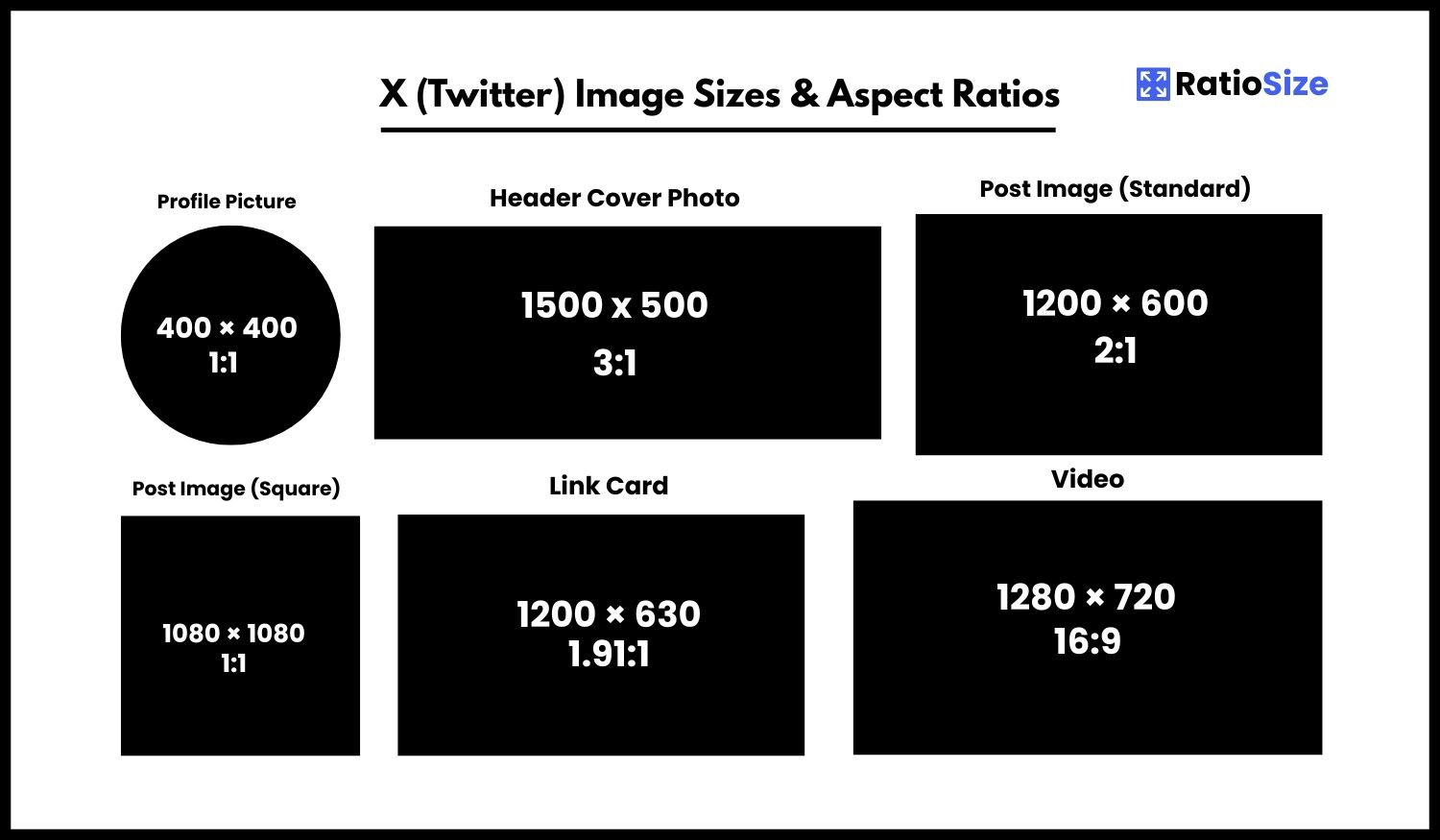
X (Twitter) Image Size Chart
| Content Type | Aspect Ratio | Dimensions (pixels) | Notes |
|---|---|---|---|
| Profile Picture | 1:1 | 400 × 400 | Displayed as a circle |
| Header Image | 3:1 | 1500 × 500 | Top of profile page |
| Post Image | 2:1 | 1200 × 600 | Standard timeline image |
| Square Post | 1:1 | 1200 × 1200 | Alternative format |
| Multiple Images | Various | 700 × 700 (per image) | Up to 4 images per post |
| Link Card | 1.91:1 | 1200 × 628 | URL preview image |
| Video | 16:9 | 1280 × 720 | Max 2min 20sec (standard) |
| Ad Image | 2:1 | 1200 × 600 | Promoted tweet format |
Profile Elements
Your profile's visual elements are crucial for brand recognition and personal identity on X. These elements remain visible whenever someone visits your profile and appear in various sizes across the platform.
Profile Picture
The profile picture is one of the most important visual elements on X, appearing alongside all your posts and interactions.
- Recommended size: 400 × 400 pixels
- Display format: Circular crop
- File size limit: 2MB
- File formats: JPG, PNG, or GIF
Pro tip: While X displays your profile picture as a circle, you'll upload it as a square. Ensure all important elements are centered within the image, leaving about 15% margin around the edges to account for the circular crop. For brand logos, consider using a PNG with a transparent background for a cleaner look.
Header Image
The header image (sometimes called a banner or cover photo) spans the top of your profile page and offers prime real estate for expressing your personal or brand identity.
- Recommended size: 1500 × 500 pixels
- Aspect ratio: 3:1
- File size limit: 5MB
- Safe zone: Center 1200 × 400 pixels
Important note: Your header image displays differently on mobile versus desktop. Keep essential content centered, as the edges may be cropped on smaller screens. Remember that your profile picture overlays the bottom left portion of the header, so avoid placing important elements in that area.
Post Images
X supports several image formats for posts (formerly called tweets). The platform will automatically process your images, but using the recommended dimensions ensures they display as intended.
Standard Post Images (2:1)
The recommended format for standalone images in X posts is 2:1 (landscape), which displays well in timelines across all devices.
- Recommended size: 1200 × 600 pixels
- Minimum size: 600 × 300 pixels
- Maximum file size: 5MB (photos) or 15MB (GIFs)
- Supported formats: JPG, PNG, GIF (animated GIFs supported)
Alternative Formats
While 2:1 is recommended, X supports various image ratios:
- Square (1:1): 1200 × 1200 pixels
- Portrait: Up to 1:3 ratio, though taller images may be cropped
- Wide Landscape: Up to 5:1, but this may not display optimally
Multiple Images
X allows you to share up to four images in a single post. These images are displayed in a grid format with specific layouts:
- Two images: Side by side, equal size (1:1 each)
- Three images: One large (1:1) on left, two stacked (1:1 each) on right
- Four images: 2×2 grid of equal-sized squares (1:1 each)
- Recommended size: 700 × 700 pixels per image
Design consideration: When planning multiple image posts, consider how they'll appear in the grid layout. Images will be cropped to fit their position, so compose each image with this in mind.
Link Cards
When you include a URL in your X post, the platform automatically generates a preview card displaying an image from the linked website, typically using Open Graph or Twitter Card metadata.
- Recommended size: 1200 × 628 pixels
- Aspect ratio: 1.91:1
- Minimum size: 600 × 314 pixels
- Display: Below the text content of your post
Website optimization tip: If you manage a website, ensure it has properly configured Open Graph and Twitter Card metadata so your links display optimally when shared on X. The meta tags should specify an appropriate image that meets these dimensions.
Video Content
X has significantly expanded its video capabilities over the years, allowing users to share various types of video content.
Standard Video Posts
- Recommended size: 1280 × 720 pixels (720p)
- Aspect ratio: 16:9 (landscape) is standard, but X supports square and vertical formats
- Maximum length: 2 minutes and 20 seconds (standard accounts), 10 minutes (X Premium subscribers)
- File size limit: 512MB
- Formats: MP4 (preferred) or MOV
Video Thumbnails
X automatically generates thumbnails from your videos, but for best results:
- Match your video's aspect ratio (typically 16:9)
- Resolution: 1280 × 720 pixels for 16:9 videos
- Format: JPG or PNG
Advertising Specifications
If you're using X for advertising, specific formats are recommended for various ad types.
Image Ads
- Recommended size: 1200 × 600 pixels
- Aspect ratio: 2:1
- File size limit: 5MB
- Formats: JPG or PNG
Carousel Ads
- Recommended size: 800 × 800 pixels
- Aspect ratio: 1:1
- Cards: 2-6 images
- File size limit: 5MB per image
Video Ads
- Recommended size: 1280 × 720 pixels
- Aspect ratio: 16:9 (landscape)
- Maximum length: Varies by ad format (15 seconds to 2 minutes+)
- File size limit: 1GB
Best Practices for X (Twitter) Images
To maximize the impact of your visual content on X, consider these best practices:
- Focus on Clarity: X's timeline moves quickly, so ensure your images are clear and easy to understand at a glance.
- Optimize for Mobile: Over 80% of X users access the platform on mobile devices. Test how your images appear on smaller screens.
- Consider Text Overlay: If including text in images, keep it concise and use a font size that remains legible on mobile devices.
- Be Mindful of File Sizes: While X allows relatively large file sizes, smaller files load faster and provide a better user experience.
- Use High-Contrast Images: Images with good contrast stand out better in X's interface and are more accessible to users with visual impairments.
Staying Updated with X's Changes
Since rebranding from Twitter to X in 2023, the platform has undergone significant changes and continues to evolve. While the core image specifications have remained relatively stable, it's worth periodically checking for updates to ensure your content appears as intended.
By following these guidelines and keeping your content optimized for X's specifications, you'll ensure your posts achieve maximum visual impact and engagement across the platform.