Why Pinterest Image Sizes Matter
Pinterest is a visual discovery platform with more than 552 million monthly active users who come specifically to find visual inspiration and ideas. Unlike other social platforms that prioritize social connections, Pinterest functions more like a visual search engine, with users actively looking for content that inspires them. This unique focus on discovery makes image optimization especially critical.
Using the correct image dimensions and aspect ratios on Pinterest directly impacts visibility, engagement, and click-through rates. The platform's algorithm favors properly sized images that display well across various devices. Additionally, Pinterest users engage more with visually appealing, properly formatted pins that stand out in the feed while providing clear, valuable content.
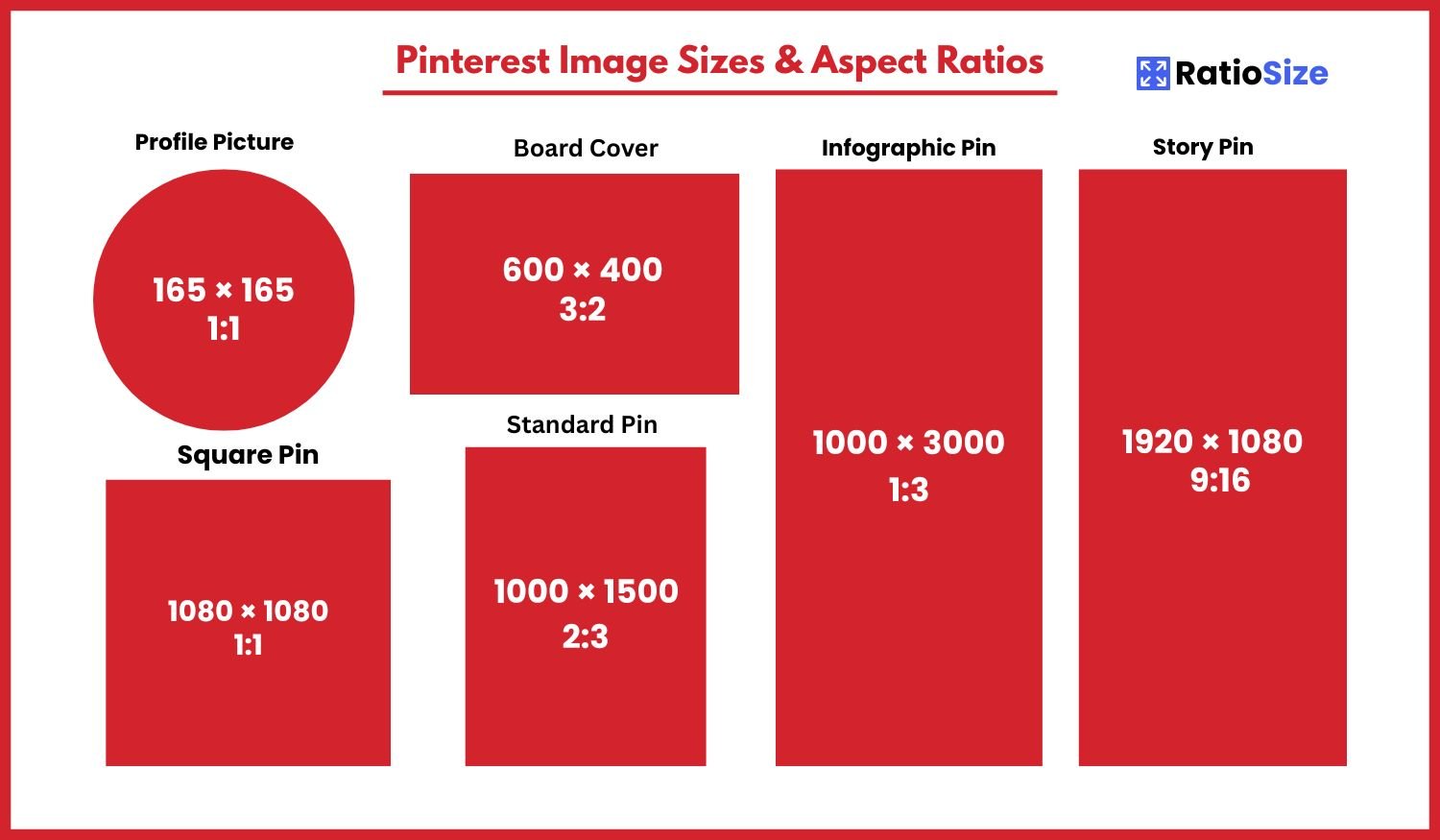
Pinterest Image Size Chart
| Content Type | Aspect Ratio | Dimensions (pixels) | Notes |
|---|---|---|---|
| Standard Pin | 2:3 | 1000 × 1500 | Best overall performance |
| Square Pin | 1:1 | 1000 × 1000 | Good for product images |
| Long Pin | 1:2.1 | 1000 × 2100 | For recipes, tutorials |
| Infographic | 1:3 | 1000 × 3000 | Maximum ratio: 1:3.5 |
| Profile Picture | 1:1 | 165 × 165 | Displays as circle |
| Board Cover | 3:2 | 600 × 400 | Featured pin in board |
| Story/Idea Pin | 9:16 | 1080 × 1920 | Up to 20 pages |
| Video Pin | 2:3 | 1000 × 1500 | 4 sec - 15 min length |
| Promoted Pin | 2:3 | 1000 × 1500 | Max file size: 20MB |
Pin Formats and Best Practices
Pinterest offers several pin formats to showcase your content. Understanding the strengths and limitations of each format is crucial for maximizing engagement.
Standard Pins (2:3)
The 2:3 aspect ratio is widely considered the optimal format for Pinterest, offering the best blend of visibility and engagement.
- Recommended size: 1000 × 1500 pixels
- Minimum size: 600 × 900 pixels (to maintain quality)
- Maximum size: 2000 × 3000 pixels
- File formats: PNG or JPG (PNG preferred for text and graphics)
- File size limit: 32MB (but try to keep under 10MB for better loading)
Performance note: Pinterest's own research indicates that pins with a 2:3 aspect ratio receive the most engagement and distribution in the feed. This ratio provides enough vertical space to showcase content while still being fully visible without requiring users to click to see the entire image.
Square Pins (1:1)
Square pins work well for certain types of content and provide consistency when cross-posting from platforms like Instagram.
- Recommended size: 1000 × 1000 pixels
- Minimum size: 600 × 600 pixels
- Best for: Product shots, food photography, and content repurposed from Instagram
Usage tip: While square pins don't maximize the available vertical space on Pinterest, they can perform well for specific content types, particularly product photos where a square crop frames the item effectively.
Long Pins (1:2.1 to 1:3.5)
Longer pins provide more vertical space for detailed content but should stay within Pinterest's recommended ratios to avoid truncation.
- Recommended size: 1000 × 2100 pixels (1:2.1)
- Maximum ratio: 1:3.5 (e.g., 1000 × 3500 pixels)
- Best for: Infographics, step-by-step tutorials, recipes, and listicles
Important limitation: Pinterest will show only the top portion of very tall pins in feeds, requiring users to click to see the full content. Additionally, pins exceeding the 1:3.5 ratio may be automatically truncated or receive less distribution in the algorithm.
Infographic Pins
Infographics are a popular content type on Pinterest, allowing creators to share detailed information in a visually appealing format.
- Recommended size: 1000 × 3000 pixels (1:3 ratio)
- Design strategy: Place the most important information at the top
- Text size: Use larger text than you might for other platforms to ensure readability
Optimization tip: Consider creating "teaser" infographics that show compelling information at the top, encouraging users to click through to your website for the complete content. This strategy can drive more traffic while still providing value in the Pinterest feed.
Profile Elements
Beyond pins, your Pinterest profile contains several visual elements that require specific dimensions for optimal display.
Profile Picture
Your Pinterest profile picture appears alongside your pins, comments, and on your profile page.
- Recommended size: 165 × 165 pixels
- Displayed as: Circle (similar to many social platforms)
- Minimum size: 165 × 165 pixels (Pinterest will resize smaller images, potentially reducing quality)
- Format: JPG or PNG
Profile picture tip: Because Pinterest profile pictures display as relatively small circles, simple logos or close-up portraits work best. Avoid complex designs with small details or text that will be illegible at smaller sizes.
Board Covers
Board covers are the images that appear at the top of your Pinterest boards, helping to visually organize your profile.
- Displayed aspect ratio: 3:2
- Recommended size: 600 × 400 pixels
- Selection method: Choose any pin within the board to serve as the cover
Branding strategy: For a cohesive profile appearance, consider creating custom cover images for your boards that follow your brand's visual style. This creates a polished, professional look when users visit your profile.
Video Pins
Video content has become increasingly important on Pinterest, with videos often receiving higher engagement than static images.
- Recommended aspect ratio: 2:3 (same as standard pins)
- Recommended size: 1000 × 1500 pixels
- Duration: 4 seconds to 15 minutes
- File size limit: 2GB
- Formats: MP4, MOV, or M4V
- Cover image: Auto-generated from the video or custom upload
Video performance tips:
- Include your brand or key message in the first few seconds
- Design for sound-off viewing (many users browse without audio)
- Keep videos under 30 seconds for best engagement
- Include text overlays to explain concepts without requiring audio
- Select or upload a compelling cover image that encourages clicks
Idea Pins (Formerly Story Pins)
Idea Pins are multi-page content pieces that combine images, video, and text to create comprehensive, step-by-step content.
- Aspect ratio: 9:16 (vertical, similar to Instagram Stories)
- Recommended size: 1080 × 1920 pixels
- Pages: Up to 20 pages per Idea Pin
- Content types: Images, videos (up to 60 seconds per page), and text
Idea Pin strategy: These pins perform best when they provide clear, step-by-step instructions or ideas. Break complex concepts into simple pages, use concise text, and incorporate both images and video for maximum engagement.
Shopping and Product Pins
If you're using Pinterest for e-commerce, product pins have specific requirements and best practices.
- Recommended aspect ratio: 2:3 or 1:1
- Recommended size: 1000 × 1500 pixels (2:3) or 1000 × 1000 pixels (1:1)
- Background: Simple, uncluttered backgrounds perform best
- Multiple products: Focus on one product per pin for better performance
Product photography tip: Lifestyle images showing products in use typically outperform plain product photos on white backgrounds. Consider creating pins that show your products in context to inspire potential buyers.
Pinterest Ads (Promoted Pins)
Promoted Pins follow the same format guidelines as organic pins but have some additional specifications:
- Recommended aspect ratio: 2:3
- Recommended size: 1000 × 1500 pixels
- Maximum file size: 20MB
- Text overlay: Less than 30% of the image should be text
- Quality requirement: Higher standards for image clarity and resolution
Ad performance best practices:
- Use high-quality, lifestyle-focused imagery
- Include clear branding but keep it subtle
- Limit text overlays to essential messaging
- Use clear calls-to-action in the pin description
- Test multiple versions to identify top performers
Technical Specifications
File Types
- Images: PNG or JPG (PNG recommended for graphics with text)
- Videos: MP4, MOV, or M4V
- Maximum file size: 32MB for images, 2GB for videos
- Color space: sRGB (standard web color space)
Image Quality Guidelines
- Resolution: High resolution images (at least 600px on the shortest side)
- Compression: Minimal compression to maintain quality
- Text: Readable text size (test on mobile devices)
- Clarity: Sharp, well-lit images perform best
Pin Design Best Practices
Beyond dimensions, consider these design principles to create high-performing Pinterest content:
- Vertical Orientation: Embrace vertical formats to maximize screen real estate on mobile devices, where most Pinterest browsing occurs.
- Clear Focal Point: Include a distinct focal point that quickly communicates what the pin is about.
- Bold Typography: If including text, use clear, bold fonts that are easily readable even on small screens.
- Brand Consistency: Maintain consistent visual branding across pins to increase recognition over time.
- Color Psychology: Use color strategically—bright, warm colors often perform well, but test what works for your specific audience.
- Seasonal Relevance: Pinterest users often search for seasonal content months in advance; time your pins accordingly.
Device Considerations
Pinterest is primarily accessed on mobile devices, which influences how your pins should be designed:
- Mobile-first design: Approximately 85% of Pinterest usage occurs on mobile devices
- Text size: Ensure any text is large enough to read on small screens
- Testing: Preview how your pins look on both mobile and desktop before publishing
- Tap targets: If creating click-through pins, ensure the entire image works as a tap target
Pinterest Algorithm Considerations
Pinterest's algorithm favors certain types of content, which should influence your image sizing and design strategy:
- Fresh content: The algorithm prioritizes new pins over repins
- Quality signals: High-resolution, properly sized images receive better distribution
- Engagement metrics: Pins that receive saves, clicks, and close-ups get more distribution
- Relevance: Pins that closely match search and browsing patterns perform better
- Text recognition: Pinterest can read text on pins, so ensure text is relevant to your target keywords
Creating Pinterest-Optimized Images
There are several approaches to creating properly sized images for Pinterest:
Design Tools
- Canva: Offers pre-sized templates specifically for Pinterest
- Adobe Express: Includes Pinterest-specific dimensions and templates
- Photoshop: Create custom templates using the dimensions in this guide
- Over/GoDaddy Studio: Mobile-friendly design app with Pinterest presets
- Tailwind Create: Automatically generates Pinterest-optimized images
Website Integration
For bloggers and website owners, integrating Pinterest-optimized images into your site is crucial:
- Hidden Pinterest images: Include taller, Pinterest-optimized images that only display when users click "Pin"
- OpenGraph tags: Specify the preferred image dimensions in your website's metadata
- Pin It buttons: Add hover buttons to images to encourage pinning
- Alt text: Include keyword-rich alt text that becomes the default pin description
Common Pinterest Image Issues and Solutions
Problem: Blurry or Low-Quality Images
Solution:
- Start with high-resolution source images
- Use minimal compression when saving
- Stay within the recommended size ranges
- Use PNG format for graphics with text
Problem: Images Being Cropped Unexpectedly
Solution:
- Stay within the recommended aspect ratios (especially for very tall pins)
- Test pins on both mobile and desktop before finalizing
- Keep critical elements away from edges
- Use the Pinterest preview function when pinning
Problem: Poor Mobile Display
Solution:
- Design for mobile-first (small screens)
- Use larger text than you might for desktop-only content
- Test readability on actual mobile devices
- Simplify designs to ensure they work at smaller sizes
Evolving Pinterest Features
Pinterest regularly introduces new features and formats. As of 2025, these are the latest developments to consider:
- Enhanced Idea Pins: More interactive elements and shopping features
- AR Try-On: Augmented reality features for certain product categories
- Extended Video Length: Longer video content options for certain categories
- Shopping Integration: Enhanced product tagging and catalog features
Staying current: Follow Pinterest's business blog and creator newsletter for the latest format updates and best practices.
Measuring Performance and Iterating
Finally, it's important to track how different pin formats and sizes perform for your specific content and audience:
- A/B testing: Create multiple versions of pins with different dimensions to see which perform best
- Analytics review: Use Pinterest Analytics to track engagement metrics by pin format
- Audience specificity: What works for one niche may not work for another; test with your specific audience
- Seasonal variations: Image performance may vary by season or trend cycle
By following these guidelines and continually optimizing your approach, you'll create Pinterest content that stands out, engages your target audience, and drives meaningful results for your brand or business.