Why LinkedIn Image Dimensions Matter
LinkedIn is the world's premier professional networking platform, with over 1.1 billion members across more than 200 countries and territories. As a business-focused network, the visual presentation of your profile, company page, and content directly impacts your professional credibility and effectiveness. Using the correct image dimensions ensures your LinkedIn presence appears polished and professional across all devices and viewing contexts.
Unlike more casual social platforms, LinkedIn users have heightened expectations for professionalism. Poorly sized images that appear cropped, stretched, or pixelated can undermine your professional image, potentially affecting networking opportunities, recruiting efforts, and business development. Conversely, properly optimized images help establish credibility and make a strong first impression on potential employers, clients, and business partners.
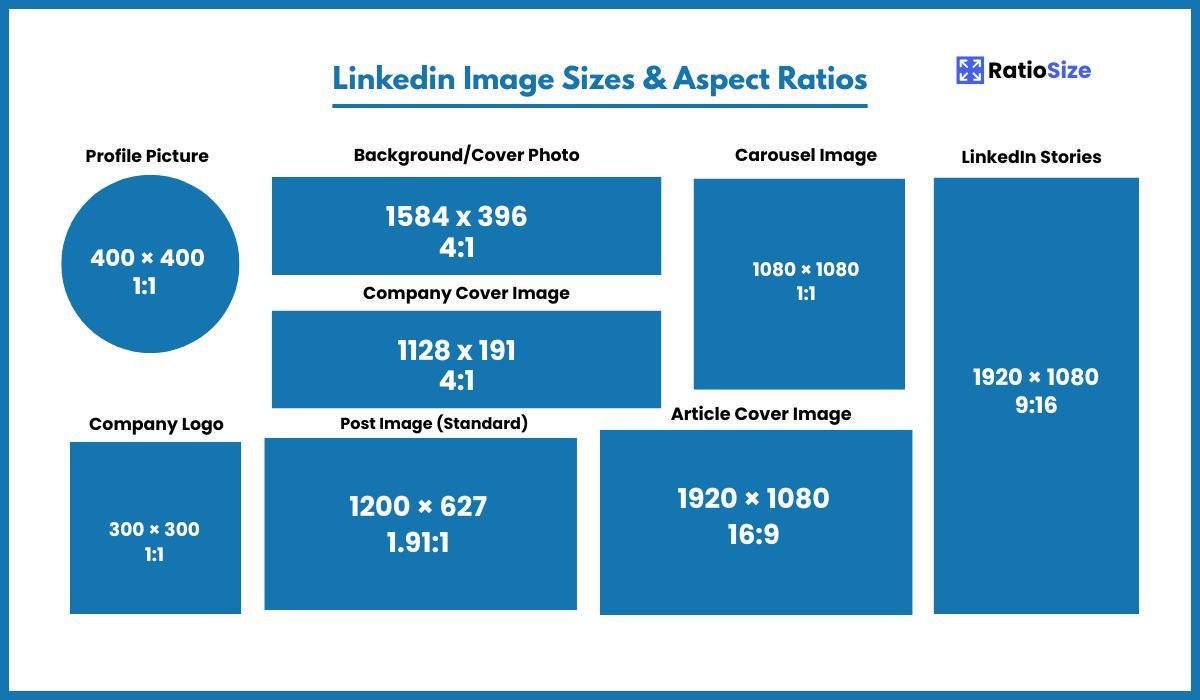
LinkedIn Image Size Chart
| Content Type | Aspect Ratio | Dimensions (pixels) | Notes |
|---|---|---|---|
| Profile Picture | 1:1 | 400 × 400 | Displayed as circle |
| Profile Background | 4:1 | 1584 × 396 | Personal profile cover |
| Company Logo (Main) | 1:1 | 300 × 300 | Primary company logo |
| Company Logo (Square) | 1:1 | 60 × 60 | Smaller icon version |
| Company Cover | 4:1 | 1128 × 191 | Company page banner |
| Standard Post | 1.91:1 | 1200 × 627 | Feed images |
| Link Post | 1.91:1 | 1200 × 627 | Link preview images |
| Article Cover | 16:9 | 1920 × 1080 | LinkedIn article header |
| Stories | 9:16 | 1080 × 1920 | Vertical full-screen format |
| Ad Image | 1.91:1 | 1200 × 627 | Standard ad format |
| Carousel Ad | 1:1 | 1080 × 1080 | Multiple swipeable cards |
Personal Profile Elements
Your LinkedIn personal profile is often the first impression you make on potential employers, clients, or business contacts. Each visual element should be carefully optimized.
Profile Picture
Your profile picture is the visual representation of your professional identity on LinkedIn. It appears in search results, in connection requests, in messaging, and on your profile.
- Recommended size: 400 × 400 pixels
- Minimum size: 200 × 200 pixels
- Format: JPG, PNG, or GIF (non-animated)
- Maximum file size: 8MB
- Display format: Circular crop on most interfaces
Professional tip: Unlike more casual social platforms, LinkedIn profile pictures should be professional headshots. Ideally, use a high-quality photo where your face occupies about 60% of the frame, you're dressed professionally, and the background is simple and non-distracting. Since the image displays as a circle, ensure no important elements are too close to the edges.
Profile Background/Cover Photo
The background image appears at the top of your personal profile and provides visual context for your professional identity.
- Recommended size: 1584 × 396 pixels
- Aspect ratio: 4:1
- Format: JPG, PNG, or GIF (non-animated)
- Maximum file size: 8MB
- Safe zone: Center of the image, as edges may be cropped on different devices
Design strategy: Your background image should complement your professional brand. Consider using industry-related imagery, a city skyline where you work, or a branded background if representing a company. Remember that your profile picture, name, and headline will overlay the left side of the background image, so avoid placing key visual elements in that area.
Company Page Elements
LinkedIn company pages require several specific image formats to establish a professional brand presence on the platform.
Company Logo (Main)
This is your primary company identifier on LinkedIn, appearing on your company page and next to content you share.
- Recommended size: 300 × 300 pixels
- Aspect ratio: 1:1 (square)
- Format: JPG or PNG (PNG recommended for logos with transparency)
- Maximum file size: 4MB
- Display contexts: Company page, search results, "companies you may want to follow" section
Branding consideration: For maximum visibility and brand recognition, use your primary logo mark here rather than a full logotype with text, as the image may appear quite small in some contexts.
Company Logo (Square)
This smaller version of your company logo appears in various contexts throughout LinkedIn.
- Recommended size: 60 × 60 pixels
- Aspect ratio: 1:1 (square)
- Display contexts: Company comments, company notifications
Note: While LinkedIn lists this as a separate image type, they often generate it automatically from your main company logo. It's best to ensure your main logo works well when displayed at this smaller size.
Company Cover Image
This banner appears at the top of your company page and helps establish your visual brand identity.
- Recommended size: 1128 × 191 pixels
- Aspect ratio: approximately 5.9:1
- Format: JPG or PNG
- Maximum file size: 4MB
Design consideration: This unusually wide, short format can be challenging to design for. Consider using a simple brand pattern, a wide panoramic image, or a color block with a smaller logo element. Avoid text near the edges, as some cropping may occur on different devices.
Content Formats
LinkedIn offers several formats for sharing content, each with specific image requirements for optimal display.
Standard Post Images
Images shared in standard LinkedIn posts should follow these specifications for best appearance in the feed.
- Recommended size: 1200 × 627 pixels
- Aspect ratio: 1.91:1
- Minimum size: 640 × 360 pixels
- Maximum file size: 5MB
Content strategy: While LinkedIn will attempt to display images of various sizes, the 1.91:1 ratio ensures your images appear properly across all devices without awkward cropping. If your image doesn't match this ratio, consider adding whitespace or redesigning it to fit these dimensions.
Link Post Preview Images
When you share a link on LinkedIn, the platform generates a preview image pulled from the linked page's metadata.
- Recommended size: 1200 × 627 pixels
- Aspect ratio: 1.91:1
- Source: Open Graph (og:image) or Twitter Card metadata from the linked website
Optimization tip: If you manage a website, ensure it has properly configured Open Graph tags with images in the 1.91:1 ratio to ensure optimal display when your content is shared on LinkedIn.
Article Cover Images
When publishing articles directly on LinkedIn, the cover image appears at the top of your article and in feed previews.
- Recommended size: 1920 × 1080 pixels
- Aspect ratio: 16:9
- Minimum size: 1200 × 675 pixels
- Maximum file size: 10MB
Design recommendation: Choose a compelling, relevant image that captures the essence of your article. Since the title will appear over the image, avoid using images that are too busy or that have text embedded in them.
LinkedIn Stories (when available)
LinkedIn occasionally offers a Stories feature similar to Instagram and Facebook Stories.
- Recommended size: 1080 × 1920 pixels
- Aspect ratio: 9:16
- Format: JPG or PNG for images, MP4 for videos
- Duration: Up to 20 seconds per story
Note: LinkedIn Stories have been removed and reintroduced at various times. When available, they follow the standard vertical story format used across most social platforms.
LinkedIn Advertising Formats
LinkedIn offers several ad formats, each with specific image requirements to ensure optimal display and performance.
Single Image Ads
The standard LinkedIn ad format featuring a single image.
- Recommended size: 1200 × 627 pixels
- Aspect ratio: 1.91:1
- Format: JPG or PNG
- Maximum file size: 5MB
- Text limitations: 150 characters for introductory text, 70 characters for headline, 300 characters for description
Performance tip: In LinkedIn ads, images that feature people, particularly in professional contexts, typically perform better than abstract imagery or plain text graphics.
Carousel Image Ads
Ads featuring multiple images that users can swipe through horizontally.
- Recommended size: 1080 × 1080 pixels
- Aspect ratio: 1:1 (square)
- Format: JPG or PNG
- Maximum file size: 5MB per image
- Cards per ad: 2-10 cards
- Text limitations: 150 characters for introductory text, 45 characters for headline, 30 characters for description
Strategic approach: Carousel ads work best when telling a sequential story or highlighting different aspects of a product or service. Ensure visual consistency across all cards while making each one distinct enough to encourage swiping.
Video Ads
Video ads appear in the LinkedIn feed and can be highly effective for engagement.
- Recommended aspect ratio: 16:9 (landscape) or 1:1 (square)
- Resolution: 1920 × 1080 pixels (16:9) or 1080 × 1080 pixels (1:1)
- Format: MP4
- Maximum file size: 200MB
- Length: 3 seconds to 30 minutes (though 15-30 seconds is recommended for optimal engagement)
- Frame rate: Less than 30 FPS
Best practice: Keep LinkedIn video ads concise and frontload key messages, as engagement typically drops after the first 10 seconds. Include captions or text overlays, as many users watch videos without sound, especially on mobile devices.
Technical Specifications and Best Practices
File Types and Sizes
LinkedIn supports various file formats for different content types:
- Images: JPG and PNG (PNG recommended for logos needing transparency)
- Video: MP4
- Maximum file sizes:
- Profile and background images: 8MB
- Company logo and cover: 4MB
- Post images: 5MB
- Video ads: 200MB
Safe Zones
For optimal display across all devices and screen sizes, keep these safe zones in mind:
- Profile backgrounds: Avoid placing important content at the edges; keep key elements centered
- Company covers: Center your most important elements horizontally and vertically
- Profile pictures: Leave approximately 20% margin around the edges to account for circular cropping
Design strategy: When designing background or cover images, remember that they will display differently on desktop versus mobile. On mobile devices, these images are typically cropped more severely, so keeping important elements centered is crucial.
LinkedIn Image Strategy by Goal
Different LinkedIn goals require different image strategies. Consider these approaches based on your objectives:
Job Seeking
- Profile picture: Use a professional headshot where you're dressed appropriately for your industry
- Background image: Consider imagery related to your industry or aspirations, or a simple professional pattern
- Content sharing: Focus on industry insights and thought leadership with high-quality, professional imagery
B2B Marketing
- Company logo: Ensure your logo is clear and recognizable even at small sizes
- Company cover: Showcase your products, team, or brand messaging
- Post images: Use data visualizations, product imagery, or professional situational photos
- Ads: Focus on solution-oriented imagery that addresses business pain points
Thought Leadership
- Article covers: Use compelling, conceptual imagery related to your topic
- Post images: Include data visualizations, quote graphics, or industry-specific imagery
- Profile elements: Ensure consistency with your personal brand across all visual elements
Common LinkedIn Image Issues and Solutions
Problem: Image Quality Degradation
Solution: LinkedIn compresses uploaded images, which can affect quality. To minimize degradation:
- Start with high-resolution images that meet the exact recommended dimensions
- Use JPG format with 85-90% quality for photographic images
- Use PNG format for logos and graphics with text
- Avoid uploading images that have already been heavily compressed
Problem: Text in Images Appears Blurry
Solution: Text often suffers the most from compression. To maintain legibility:
- Use larger font sizes (minimum 14pt)
- Opt for sans-serif fonts which maintain legibility at smaller sizes
- Ensure high contrast between text and background
- Consider adding text via LinkedIn's native text tools rather than embedding it in images
Problem: Images Are Cropped Unexpectedly
Solution: To prevent unwanted cropping:
- Always use the exact recommended dimensions for each image type
- Keep important elements centered and away from edges
- Preview your profile and content on both desktop and mobile before finalizing
- For profile and cover images, use LinkedIn's built-in cropping tool to ensure proper framing
LinkedIn Platform Updates and Trends
LinkedIn regularly updates its platform and image requirements. As of 2025, these are the most recent developments to be aware of:
- Enhanced Video Features: LinkedIn has expanded video capabilities, including live video and improved analytics
- Document Sharing: PDF and presentation sharing has become increasingly prominent, with custom cover images
- Interactive Content: Polls, carousels, and other interactive elements are receiving algorithm preference
- Mobile Optimization: LinkedIn continues to prioritize mobile experience, making proper image sizing even more critical
Staying current: LinkedIn occasionally adjusts its image dimensions and introduces new content formats. Check LinkedIn's official business marketing blog or RatioSize regularly for the most up-to-date specifications.